Chamberflow · Membership software for chambers of commerce Know who will renew, what your events earn, and what the board needs, before they ask.
Chamberflow runs members, dues, events, finance and comms on one record, and its AI drafts the work for your team to check.
Built for bilateral and bi-national chambers. Multi-currency: USD, EUR, CHF and yours.
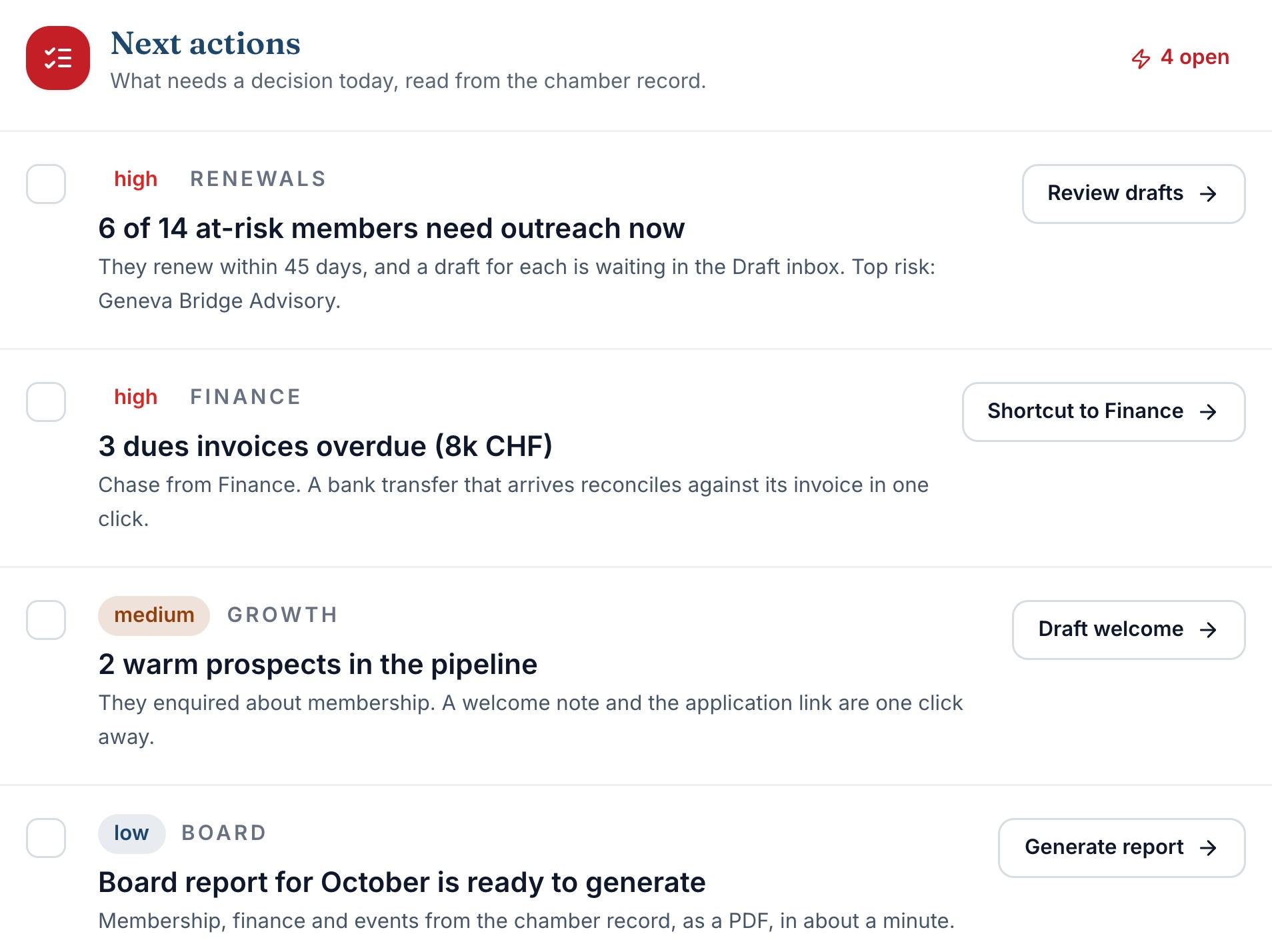
The Command Center: what needs your team today, with the drafts waiting for review.
Most chamber software was built to sell you modules, not to run your chamber.
So your team stitches it together with spreadsheets, a separate finance tool, an email blaster and a directory nobody updates. The data drifts, renewals slip, and closing the books becomes a quarterly act of faith. The board asks for numbers you spend a weekend assembling.

One member record under every screen.
Real screens from the demo workspace. Dues, events, sponsors and finance all sit on the same member record, so a change made once is right everywhere.
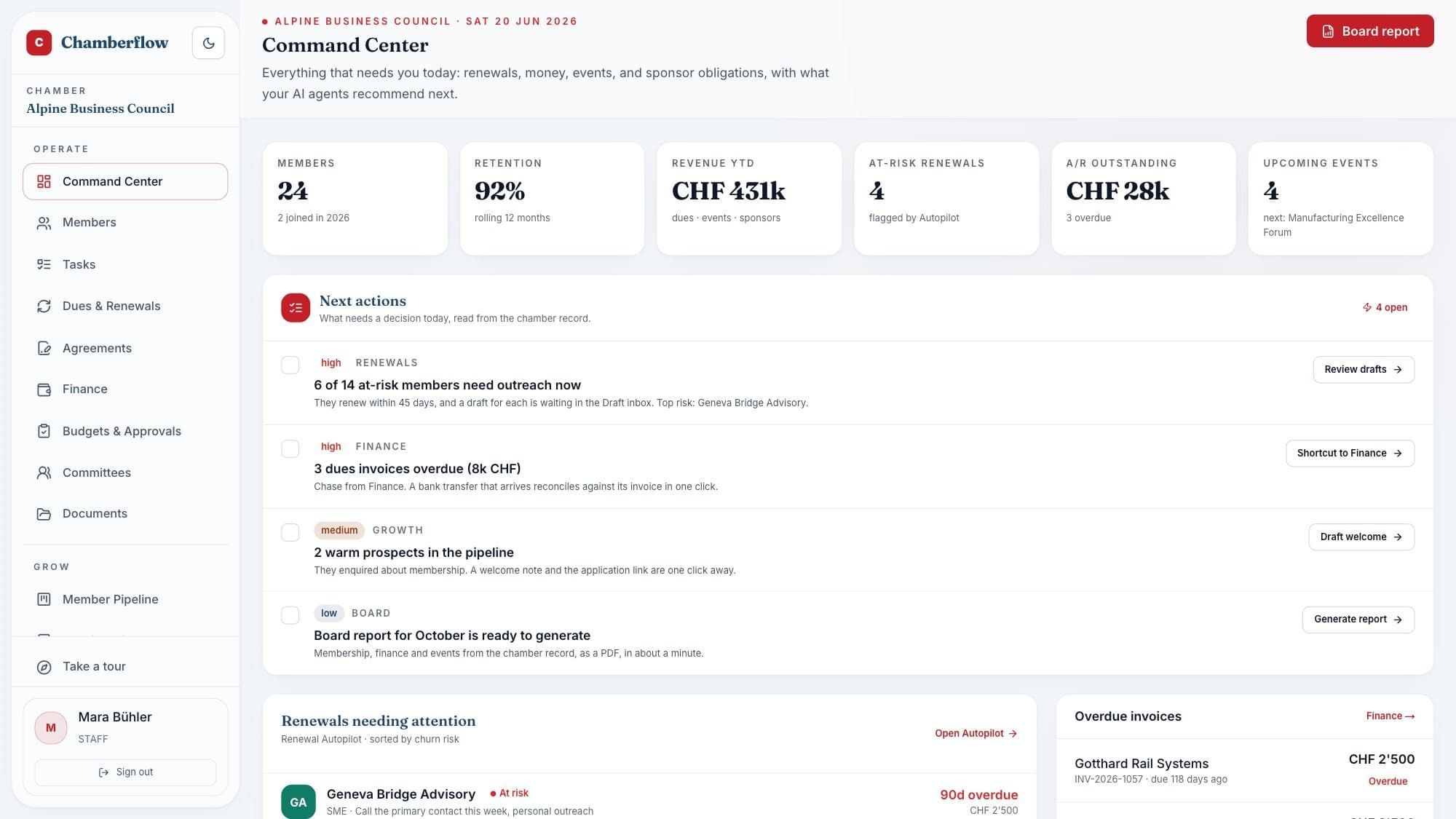
One screen that knows what needs you today
Members, retention, revenue, at-risk renewals, receivables and the event runway, then a ranked list of recommended next actions, each with the evidence behind it.
- Six KPIs across membership, money and events, on one strip
- Recommended actions ranked by impact, routed to the right module
- Renewals needing attention and overdue invoices, one click away
Renewals
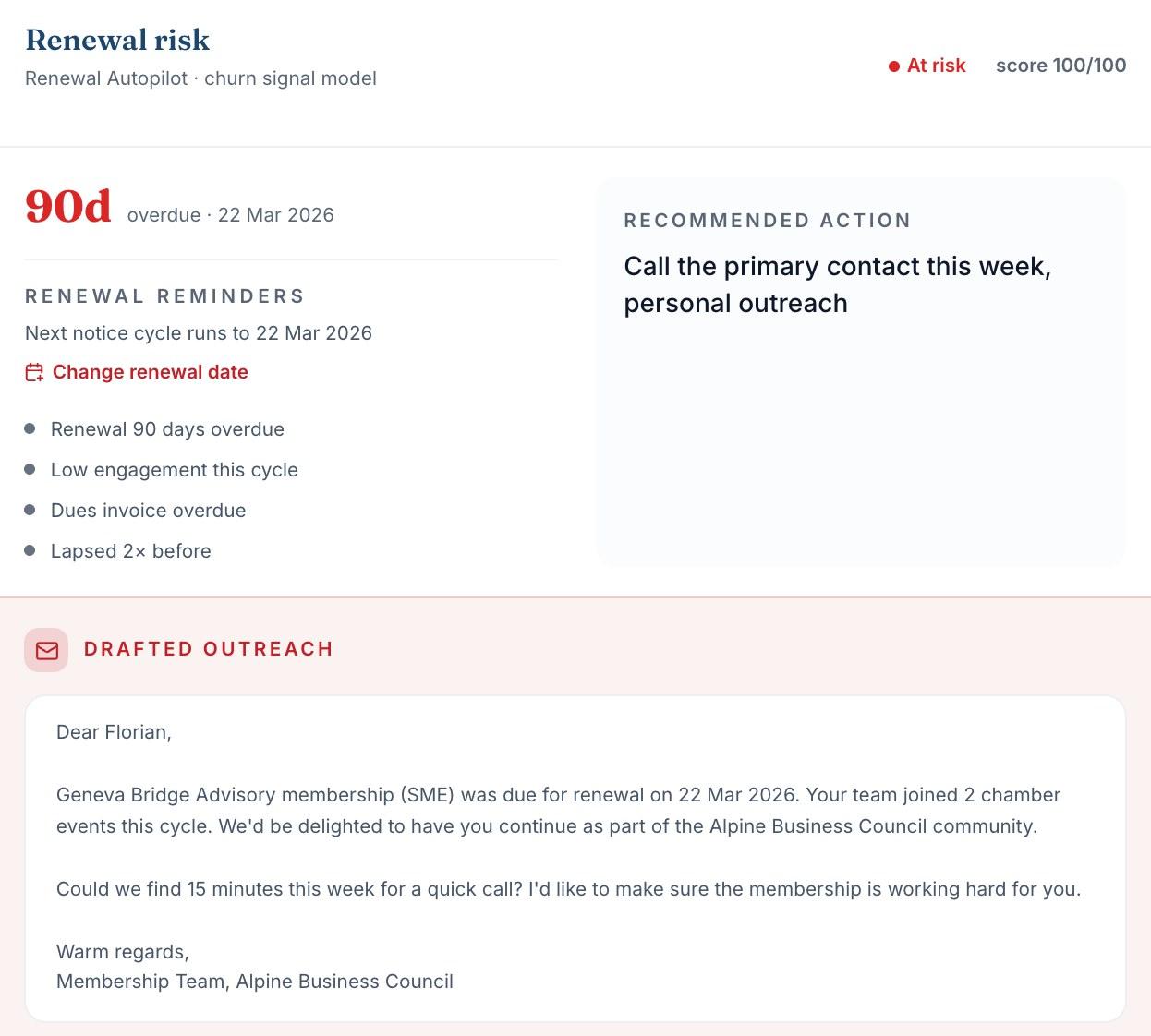
It tells you who to call this week, and drafts the message.
A churn-signal model scores every renewal from the renewal date, dues invoice status and engagement, then explains its reasons. Chamberflow drafts a personalised message from the member’s own record: events attended, invoices and recent activity. Your team reviews every draft and sends it from their own email.

Walk into the board meeting with numbers you can defend.
The packet is compiled from the live workspace, the same numbers your team works in every day, not a spreadsheet assembled the night before.
Reports & Board
The board pack that used to eat a weekend now takes one click.
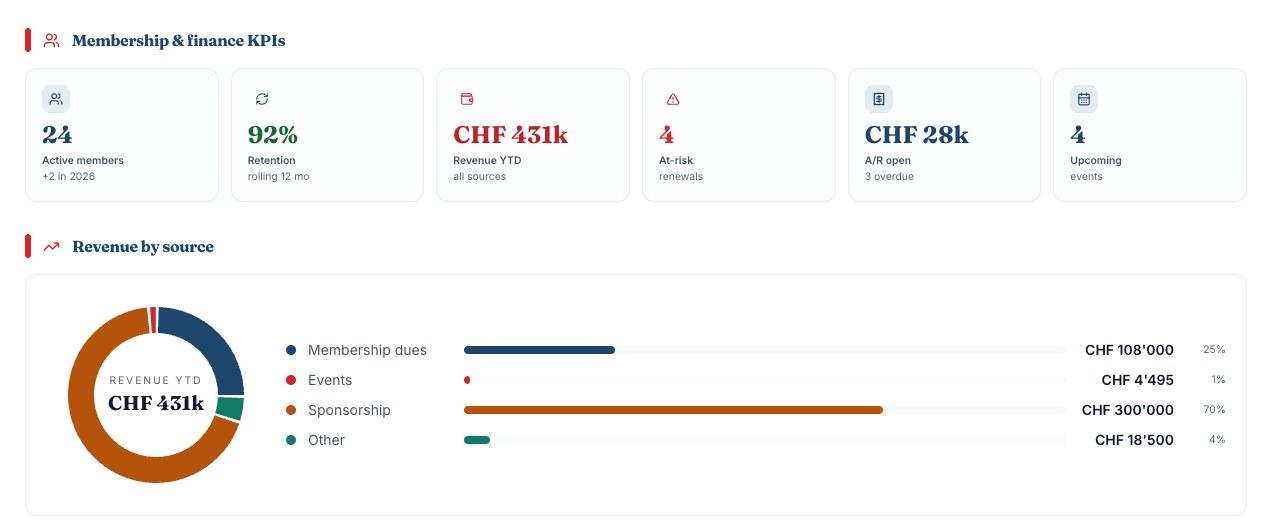
Chamberflow compiles the packet from the same live numbers the rest of the system runs on (KPIs, revenue by source, at-risk renewals, receivables, wins and the next events), laid out print-ready for the boardroom.
- Membership, finance and events in one document
- Regenerate any time the numbers move, no copy-paste
Finance
From invoice to bank statement, every dollar accounted for.
Built for how chambers actually get paid, including the members who pay by bank transfer and expect a proper receipt.

- Online payments, on your own account
- Your chamber connects its own payment account, such as Stripe for cards. Hosted, PCI-scoped checkout that settles to your account. Card data never touches Chamberflow.
- Bank transfer, for members who pay by wire
- Bank-transfer instructions sit on the invoice for members who pay by wire, and staff mark the payment received, so it lands on the same ledger as a card payment.
- Invoices and receipts that hold up
- Sequential invoice numbers with no gaps, server-rendered PDFs, receipts with the buyer’s tax ID, and A/R aging that updates as money lands.
Agreements
Membership agreements signed in the browser, filed against the member.
Send membership agreements, sponsorship contracts and event waivers for signature, pre-filled from your member records, signed on a secure tokenised page, and filed back the moment they’re done. No separate e-signature subscription required.
- 1
Compose from a template
Membership agreement, sponsorship contract or waiver: fields fill from the record.
- 2
Member signs in the browser
A secure, single-purpose link that works on any device, no account needed. Typed or drawn signature, timestamped.
- 3
Certificate and filing, automatic
A certificate of completion with the signer’s identity, a SHA-256 document hash and the audit trail; the signed PDF lands on the member record.

The work happens in the room. The system keeps up with it.
Publish the event page, take registrations and payments online, and export the guest list for the door, while the P&L updates as the seats fill.
Events and the member portal
Event pages your members will actually share.
Every event gets a branded public page with a share button, online registration and payment, and no account needed to buy a ticket. Members get a portal to pay invoices, register for events and keep their directory profile current.
- Add-to-calendar links on every event page
- A public member directory, and a signup form that feeds your approval queue
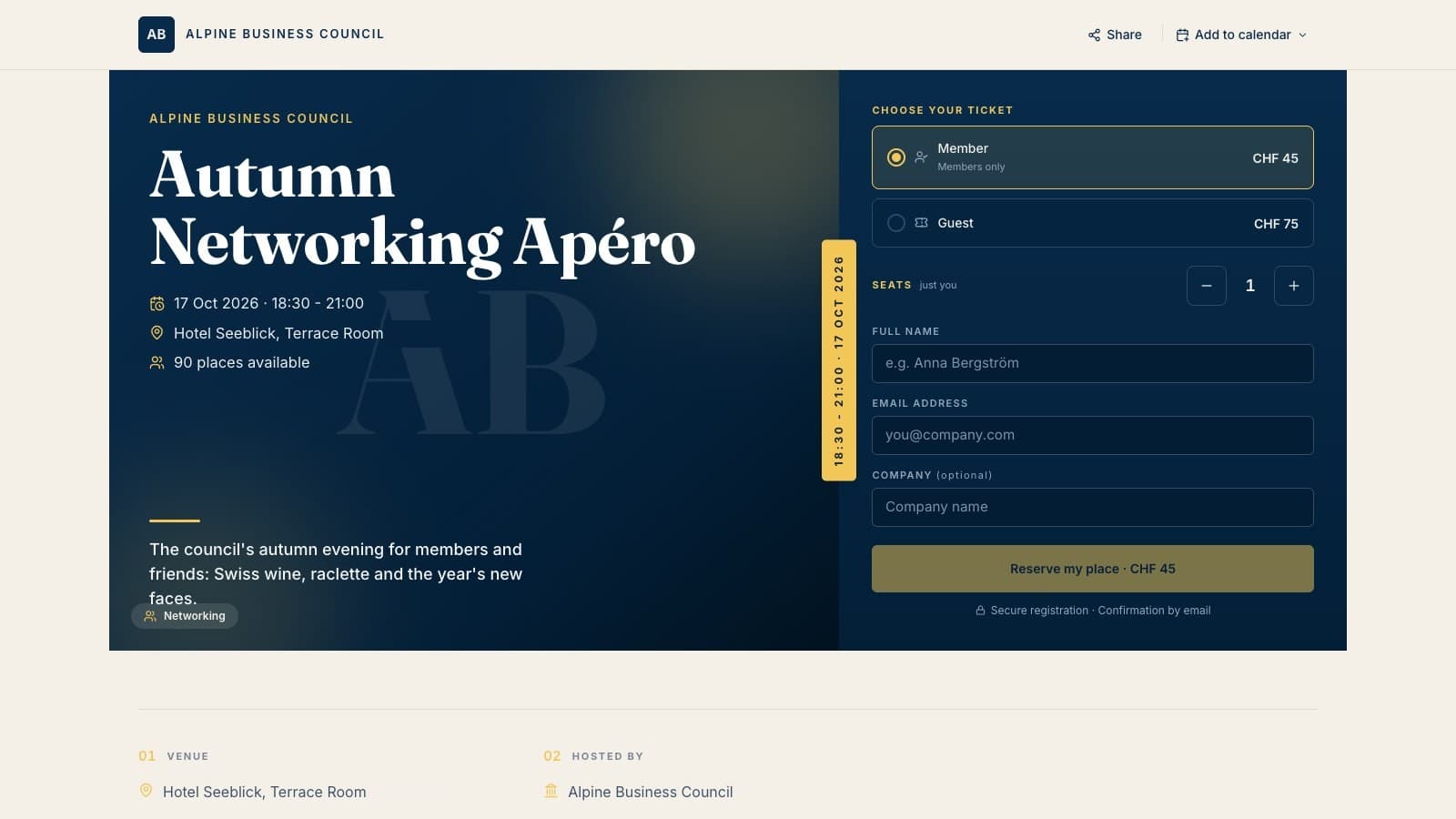
A published event page, in the chamber’s own name and colours.
AI drafts. Your people decide.
The Workbench turns notes into a filed report, an email into a member record and a meeting transcript into minutes. “Ask the workspace” answers from a live snapshot of your own members, events and invoices.
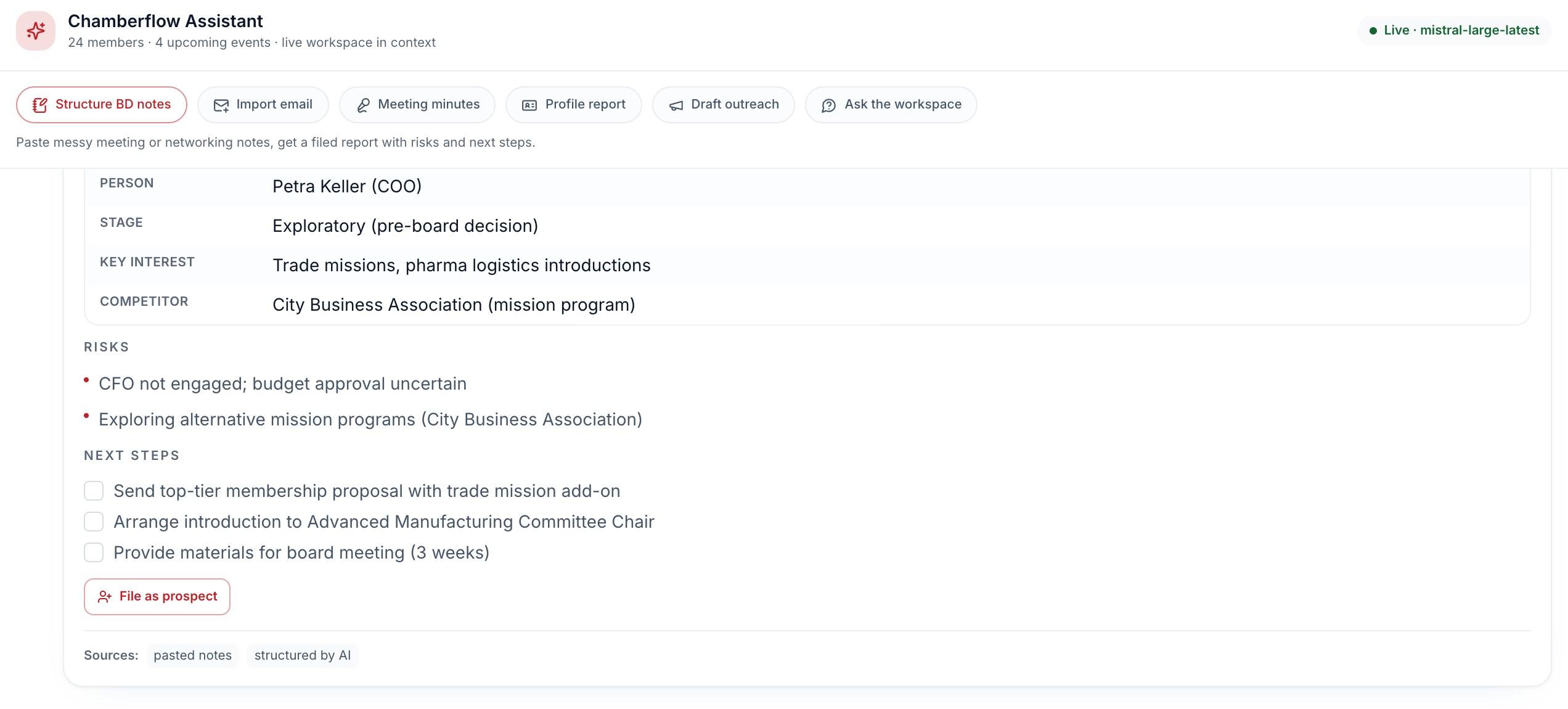
Live inference on your own workspace: if the model cannot answer, it says so. The same pattern powers renewal drafts, campaign copy and the prospect pipeline.
“We’re not trying to automate relationships. We’re trying to use automation to manage them better.”
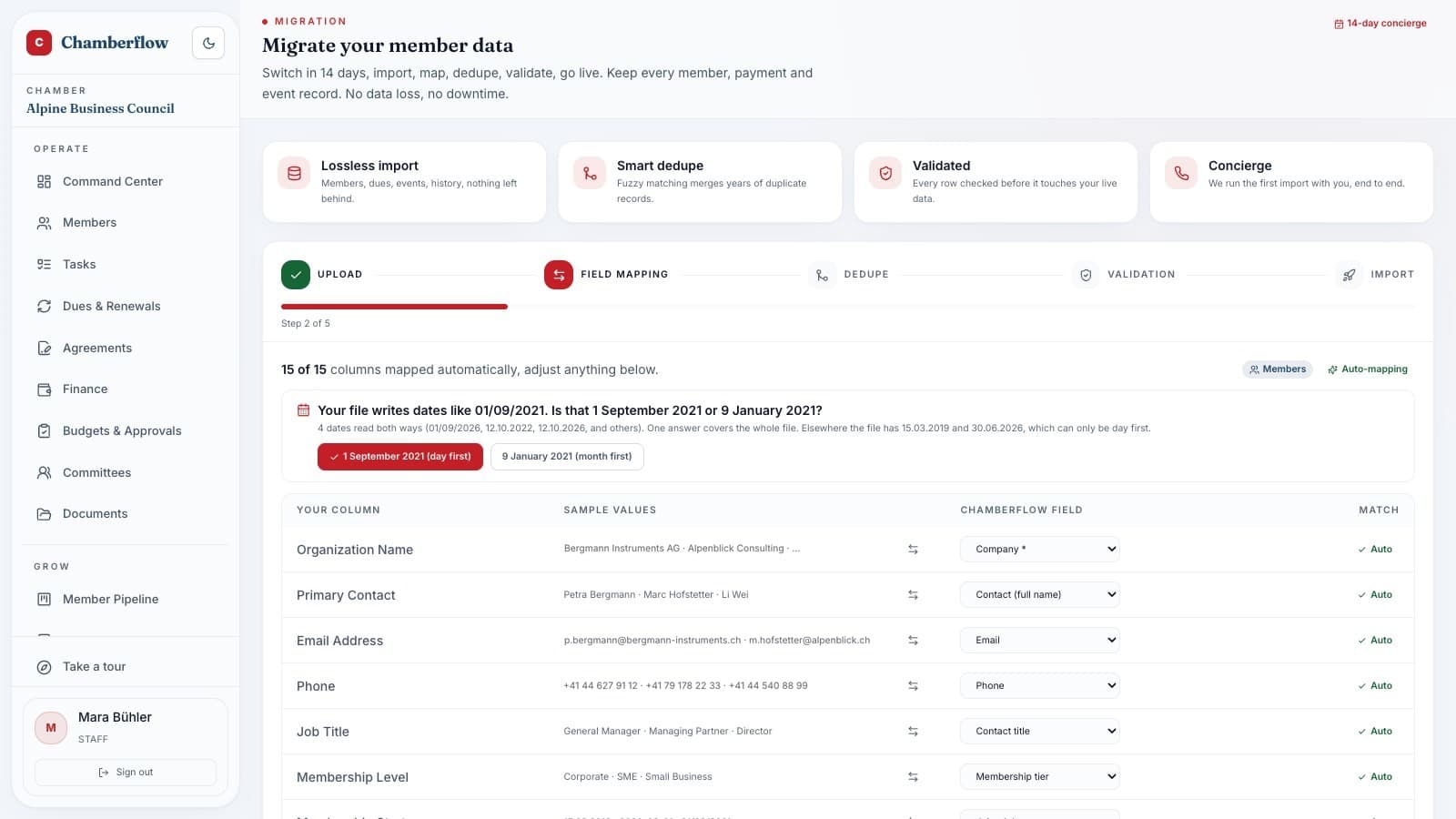
Switch systems in 14 days, with your history.
Drop your exports from your current system (any Excel/CSV) into the migration wizard. It auto-maps the columns, flags likely duplicates for merge review, and validates every row before anything is written. Our team helps you through it as part of onboarding.
- Members, invoices, payments and event attendance: .xlsx, .csv, .tsv, even messy files
- Parsing happens in your browser; your live roster is untouched until you approve
- Run a corrected file again and nothing is duplicated: gaps are filled, differences shown
Everything included. Nothing sold back to you as a module.
All modules in one subscription
- Chamberflow
- Included
- Legacy AMS platforms
- Modules priced and sold separately
Native e-signature with certificates
- Chamberflow
- Built in
- Legacy AMS platforms
- Third-party subscription
AI drafting grounded in your own data
- Chamberflow
- Built in, live inference
- Legacy AMS platforms
- Limited or none
Payments through your own payment account
- Chamberflow
- Settling directly to you
- Legacy AMS platforms
- Often platform-collected, with holds
Gapless sequential invoice numbering
- Chamberflow
- By design
- Legacy AMS platforms
- Rarely guaranteed
Public event pages with anonymous checkout
- Chamberflow
- Included
- Legacy AMS platforms
- Varies by plan
Hands-on 14-day migration
- Chamberflow
- Concierge included
- Legacy AMS platforms
- Consultant-priced
Prefer the named, detailed comparisons? Read chamber membership software compared, with prices, ChamberMaster vs GrowthZone and what it costs. New to the category? Start with what an association management system is or how chambers collect dues online.
Every chamber stays its own.
Each chamber is its own tenant, with its own name, colours, currency and members. Nothing crosses between them, so members never see another chamber’s brand.
Its own currency. USD, EUR, CHF or yours, per chamber.
One platform underneath. Every chamber runs on the same one.

Careful with your data. Paranoid with your money.
A person approves every match and campaign
Reconciliation matches, campaign sends and AI-drafted outreach all wait for a person. Reminders and notices follow rules the chamber sets.
Secrets encrypted at rest
Payment credentials are AES-256-GCM encrypted; without the key they are refused rather than stored unencrypted. Passwords are bcrypt-hashed.
Tenants firewalled
Your session is bound to your chamber server-side, with role-based access for admin, staff and members.
Hardened at the edge
A Content-Security-Policy, HSTS and clickjacking denial on every page, plus rate limits and input validation on public endpoints.
One subscription for the whole platform, with no module math.
Members, events, finance, communications, AI and e-signature, with the 14-day concierge migration included. Pricing is sized to your chamber; ask and we will quote it.
Get a quote
Questions chambers ask
Anything else? Write to hello@chamberflow.ai.
How long does switching platforms take?
Fourteen days, run as a concierge migration. You export from your current system (anything that can produce Excel/CSV), drop the files into the migration wizard, and it maps the columns, flags likely duplicates for merge review, and validates every row. Nothing touches your live roster until you approve the import. Our team helps you through it as part of onboarding, so there is no outside consultant to hire.
Can you import our members from Excel?
Yes. The importer reads .xlsx, .csv and .tsv (including messy multi-sheet workbooks), auto-detects headers, maps them to member fields, dedupes, and validates before anything is written. Run a corrected file again and nothing is duplicated: empty fields are filled in, and any value that differs is shown for you to decide.
Can members pay online?
Yes. Invoices can be paid from the member portal through the payment account your chamber connects, such as Stripe for cards, as a hosted, PCI-scoped checkout settling to your account. Public event pages take ticket payments without requiring an account, and bank-transfer instructions with manual mark-as-paid are built in for members who pay by wire.
Do the AI agents send things on their own?
No. That is a design rule, not a disclaimer: AI drafts wait for a person to act on them, and the app never sends one; staff copy it into their own email. Campaigns go out when staff send or schedule them. Automatic messages, such as event reminders and receipts, are not written by AI: they follow rules the chamber sets.
Can we keep our chamber’s branding?
Yes. Each chamber is its own tenant with its own name, brand colour and currency. Public event pages, invoices, receipts and campaign emails carry your chamber’s name and colours. Event pages also show a small “Powered by Chamberflow” line, and email is sent from a shared Chamberflow address, in your chamber’s name, until your chamber verifies its own sending domain.
Where does our data live, and can we get it out?
In a managed, encrypted cloud Postgres database, with per-chamber isolation enforced server-side on every request. You can export it any day while you use Chamberflow, and for 60 days after the agreement ends: members and prospects to CSV, event registrations to Excel, invoices and receipts as PDFs.
What does it cost?
One subscription for the whole platform: members, events, finance, communications, AI and e-signature. AI use includes USD 20 of model usage a year; above that you can use your own model key or buy more at cost, and we never charge for it without telling you in writing first. Pricing is sized to your chamber; book a demo and you’ll get a straight quote.
See your own chamber inside Chamberflow.
A live walkthrough of the product itself. Bring an export from your current system and watch the migration wizard work through it.
A 20-minute walkthrough. Export your data any day, and for 60 days after you leave.